
Contractor invoices that update the budget for you
Contractors and suppliers upload invoices, the project manager accepts each one and assigns it to a division or splits it across several, and actual cost to date updates on its own. Rejected invoices go back with a reason.
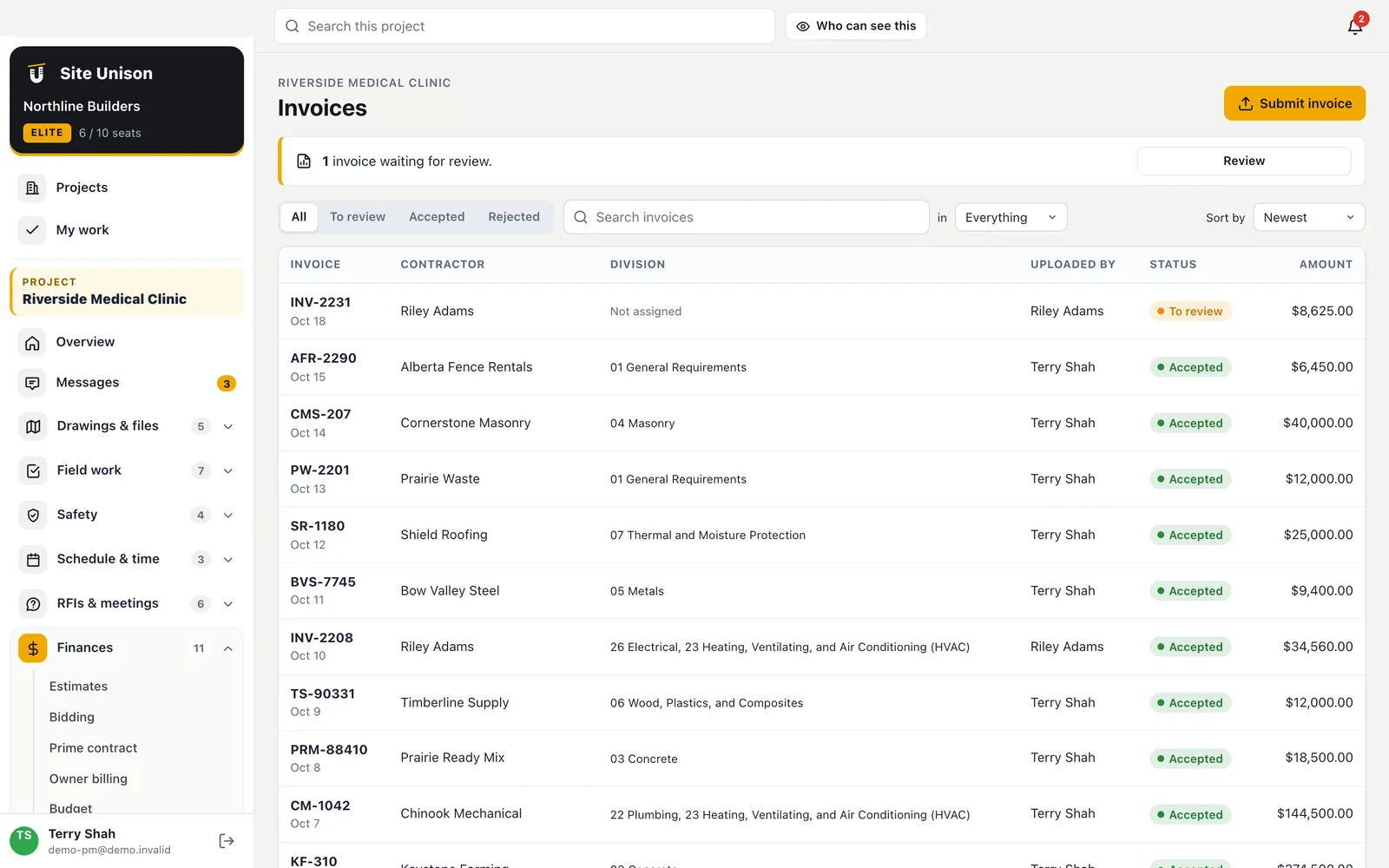
Search and sort
By contractor, division, amount, invoice number or uploader.
Notified on upload
The owner and project manager hear about every new invoice.
Invoice log
Every invoice, and where it went
Contractors upload a PDF or a photo of the invoice and the owner and project manager are notified. Sort and search the log by contractor, division, amount, invoice number or who uploaded it, and filter to the ones waiting for review or rejected.
- Search any way. Contractor, division, amount ranges like >50000, invoice number or uploader.
- Notified on upload. The owner and the project manager hear about each new invoice.
- Only the owner deletes. Invoices stay on the record.
Job costs
Actual cost comes only from accepted invoices
When the project manager accepts an invoice, they assign it to one division or split it across several with amounts. Each budget line shows its actual cost to date with the invoices behind it, and a breakdown by division, contractor, invoice and who accepted it.
- Split across divisions. Each part links back to the invoice.
- Rejected with a reason. The contractor is notified and asked to resubmit.
- Accurate actuals. Nothing counts as spent until an invoice is accepted.
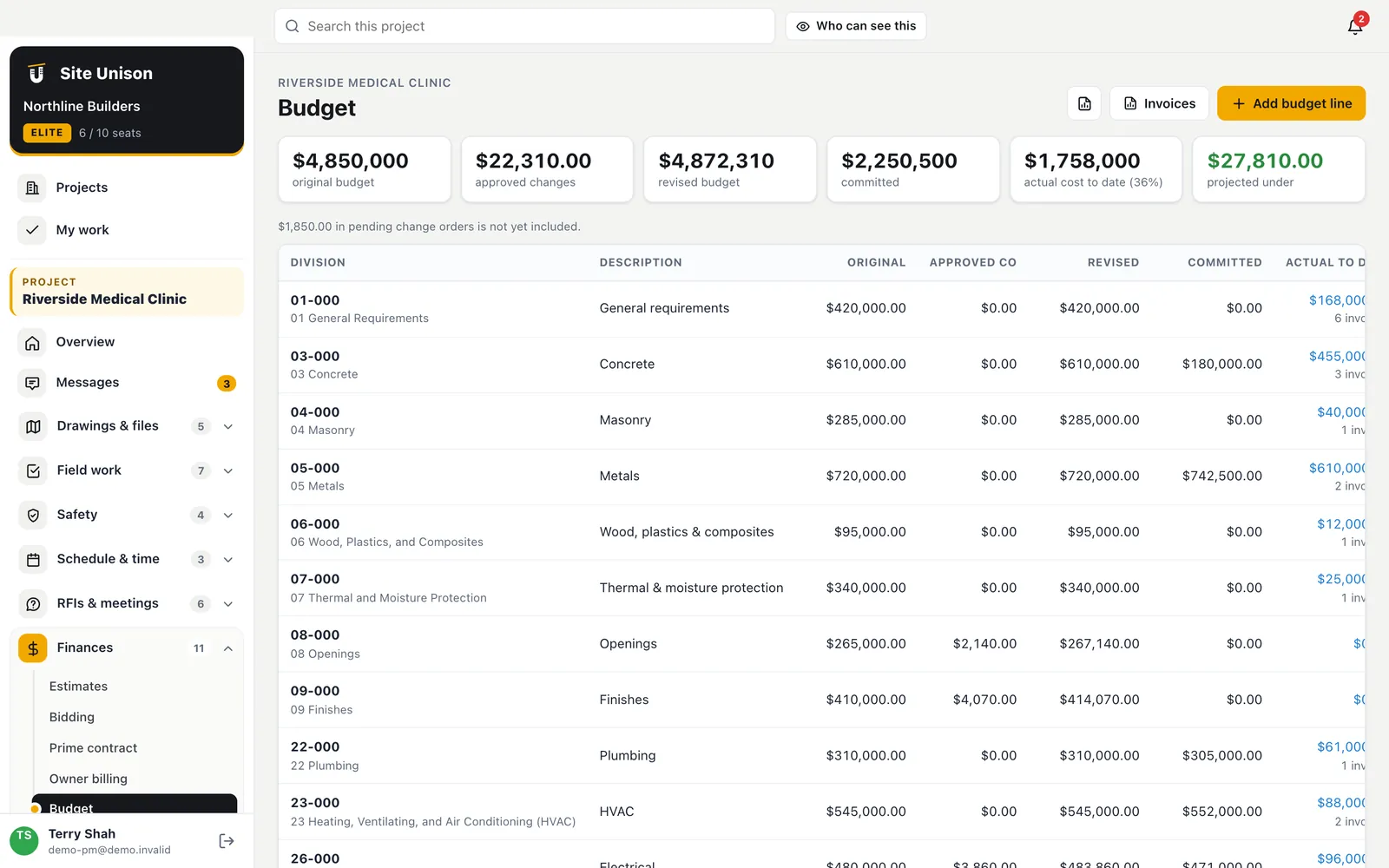
Keeping job costs current without spreadsheets
Job costs drift when invoices sit in an inbox. Contractors upload invoices, the project manager accepts each one and assigns it to a division.
Actual cost to date updates on its own, and rejected invoices go back with a reason.
A quick checklist:
- Contractors upload invoices.
- Accept and assign to divisions.
- Split across divisions when needed.
- Review cost to date.
Tax on invoices: CRA guide to GST/HST. Start free, try the live demo or compare pricing.
Questions
Common questions
Who sees invoices and costs?
The owner and project managers see every invoice and the budget. Contractors see only the invoices they submitted. Site superintendents, employees and guests never see costs.
Can I record a supplier invoice myself?
Yes. The project manager can upload an invoice on behalf of any supplier, then accept it onto the right division.
What happens when an invoice is rejected?
It moves to the rejected list with the reason, and the person who submitted it is notified and asked to resubmit a corrected invoice.
Do job costs update automatically?
Yes, as invoices are accepted.
Works with
Related features
Schedule & critical path
Microsoft Project import and export, task links, the critical path, a forecast finish, a 3-week look-ahead and a 3D build-up.
Learn more →Timesheets
Start and end shift from the phone with photos, superintendent approval and hours coded to divisions.
Learn more →Budget, changes & subcontracts
Budget by division with change events, change orders, subcontracts and POs, committed and actual cost.
Learn more →Run your next job in unison.
Start in a minute. The Free plan needs no credit card. Pro and Elite start with 14 days of Elite (estimating, billing, safety and the AI assistant): add a card, nothing is charged until the trial ends, then your plan is charged automatically. Add a sample project to explore first.